
From the heat to the quality certificate
In this walkthrough you take a heat from the lab to its quality certificate. Three areas take part:
| Who | Where | What they do |
|---|---|---|
| Laboratory | ARL Lab | Reads the samples, marks which one represents the heat (the release sample) and confirms the heat for certification. |
| Quality | Zap | Issues the delivery note’s FCI-12 certificate and signs it. |
| Invoicing | Zap | Downloads the issued certificate to send it with the invoice. |
1. Find the heat in ARL Lab
Section titled “1. Find the heat in ARL Lab”-
Open ARL Lab and go to Coladas (Heats), in the Análisis (Analysis) menu.
-
Type the number in Número de colada (Heat number) and press Buscar (Search). If there is only one, it opens on its own.
-
At the top of the detail, look at the Certificado en Zap (Certificate in Zap) block.
If it says Lista para el certificado en Zap (Ready for the certificate in Zap), the lab has already confirmed it: go on to section 4. If it says Zap puede emitir el certificado, pero la colada sale rechazada (Zap can issue the certificate, but the heat comes out rejected), it is also confirmed and Zap certifies it, but its official chemistry is outside the customer’s range and the certificate marks it as rejected. If it says … falta confirmar para certificar (… still needs confirming for certification), go on to section 3. If it says something else, the notice explains why Zap cannot issue; if it does not say who resolves it, ask the lab.
2. If something is missing, the lab resolves it in ARL Lab
Section titled “2. If something is missing, the lab resolves it in ARL Lab”The most common case is that it is not yet confirmed which analysis represents the heat:
- Falta confirmar la liberación (Release not confirmed): nobody keyed a reading as the release and the portal proposes one. Someone in the lab reviews it and presses Confirmar como liberación (Confirm as release).
- No hay muestra de liberación (No release sample): someone in the lab picks the right reading and designates it, with a reason.
- En revisión en laboratorio (Under review in the lab): someone in the lab reviews the burns and presses Confirmar (Confirm), with a reason.
The steps: Designate the release sample. As soon as the lab does it, the block changes to … falta confirmar para certificar and section 3 follows. There is nothing to do in Zap. If Quality tries to issue before that, Zap shows the first two cases as Falta designar la muestra de liberación en ARL (Release sample not designated in ARL) and the third as En revisión en laboratorio.
3. The lab confirms the heat for certification
Section titled “3. The lab confirms the heat for certification”Zap does not issue a heat’s certificate until the lab confirms it in ARL Lab. In the heat’s detail, under Certificado en Zap, look at the Certificación (Certification) block:
- ✓ Certificada: esta es la oficial. (Certified: this is the official one.): it is already confirmed. Go on to section 4.
- Sin certificar (Not certified): someone in the lab reviews the summary and presses Confirmar para certificar (Confirm for certification). From then on that chemistry is the official one, and it is what the certificate carries. Only Laboratory and Administration see the button.
- Aún no se puede confirmar para certificar: (It cannot be confirmed for certification yet:): below it lists what is missing. The button appears once all of that is resolved.
The steps: Confirm a heat for certification. If Quality tries to issue before that, Zap shows the heat as Falta confirmar en ARL (Not confirmed in ARL).
4. Quality issues the certificate in Zap
Section titled “4. Quality issues the certificate in Zap”-
In Zap, open Calidad → Certificados de calidad (Quality → Quality certificates) and press Emitir certificado (Issue certificate).
-
Pick the delivery note, add the number of each heat it carries and press Revisar en ARL (Check in ARL). Next to each heat Zap says Se puede certificar, Requiere excepción or No se puede certificar todavía (Can be certified, Needs an exception or Cannot be certified yet), with Abrir en ARL (Open in ARL) in case something is missing.
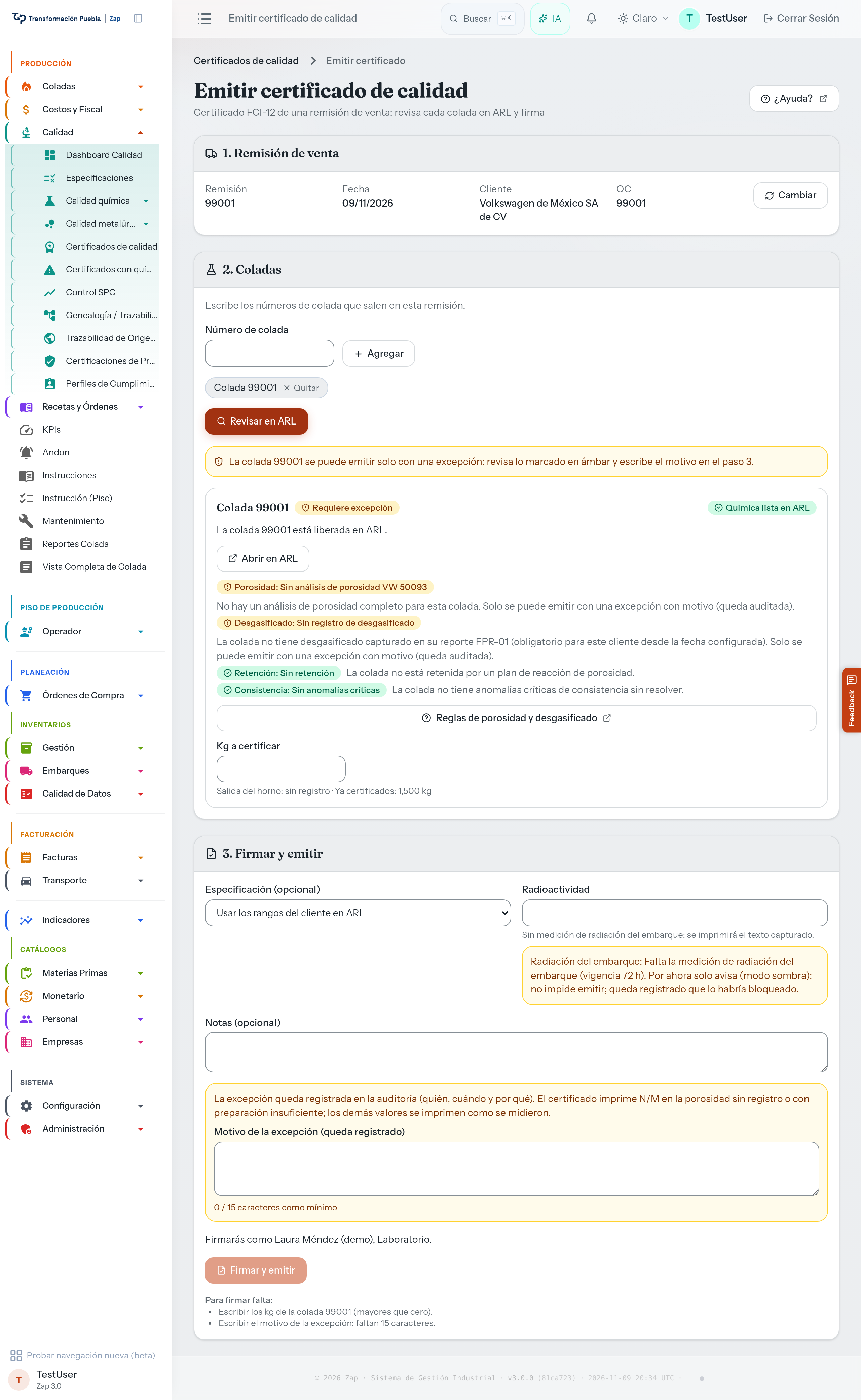
After Revisar en ARL, each heat says whether it can be certified and, if not, what is missing. -
Type the kg to certify for each heat (Zap shows how many remain Disponible, available) and press Firmar y emitir (Sign and issue). Zap asks you to confirm with your name, the delivery note and how many heats: press Firmar y emitir in that notice. When it finishes, Zap opens the certificate and says «Certificado 7101 emitido y firmado.» (Certificate 7101 issued and signed.). If something is missing, Zap lists it under the button in Para firmar falta: (Still needed to sign:). Only someone on the signers list, from the lab or management, can sign.
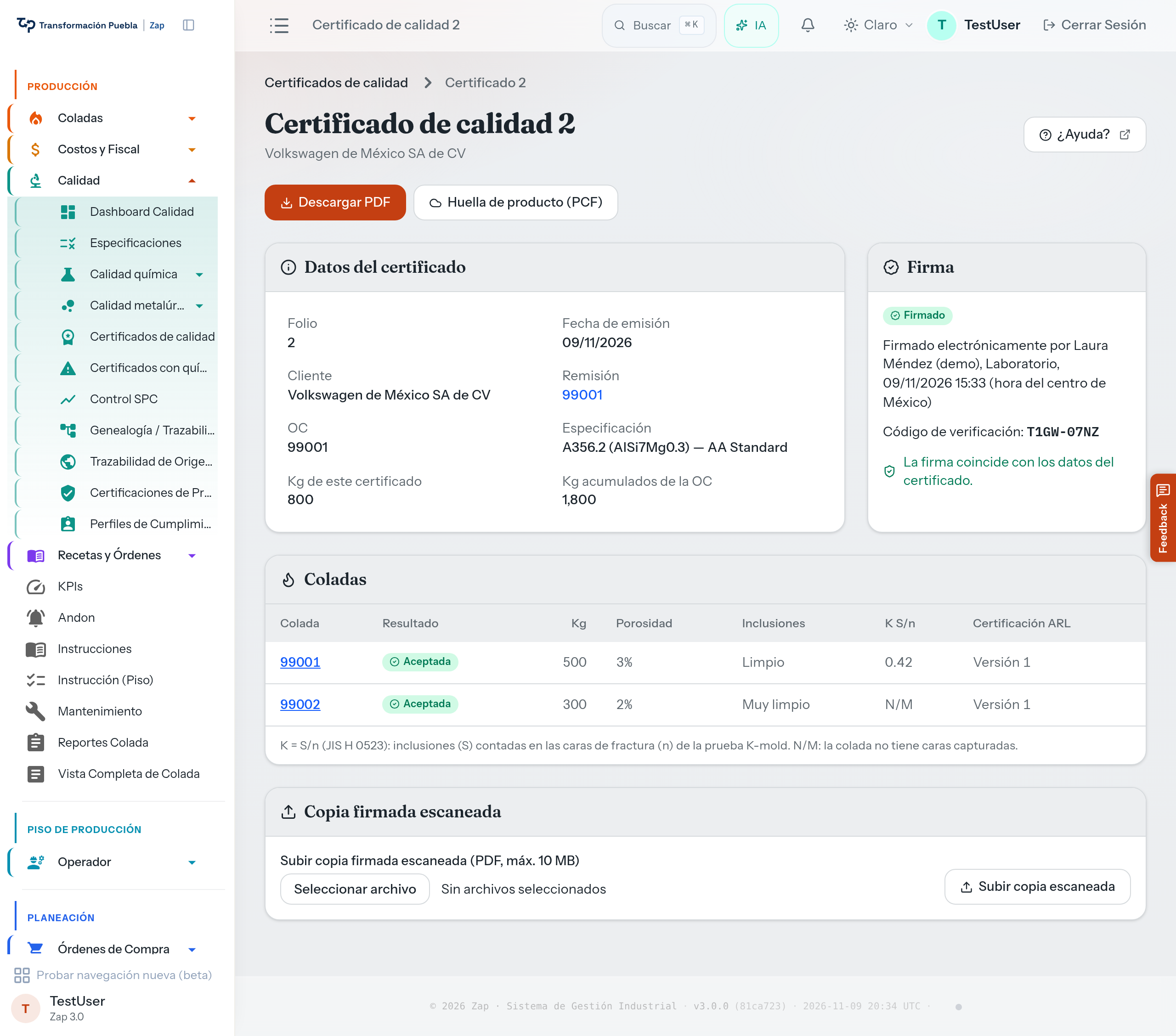
The detail of a signed certificate: who signed, when, the verification code and whether the signature matches.
Zap also checks the porosity, the degassing and whether any heat is on hold. For Volkswagen de México it also checks two things that today only warn:
- The heat’s consistency: later on it will block until Quality closes the anomaly (Resolve quality anomalies).
- Shipment radiation: the delivery note’s radiation measurement. Later on it will block until the delivery note has an Aceptado (Accepted) measurement from 72 hours ago or less (Measure a truck’s radioactivity).
What to do in each case: Issue the quality certificate.
5. Invoicing downloads it
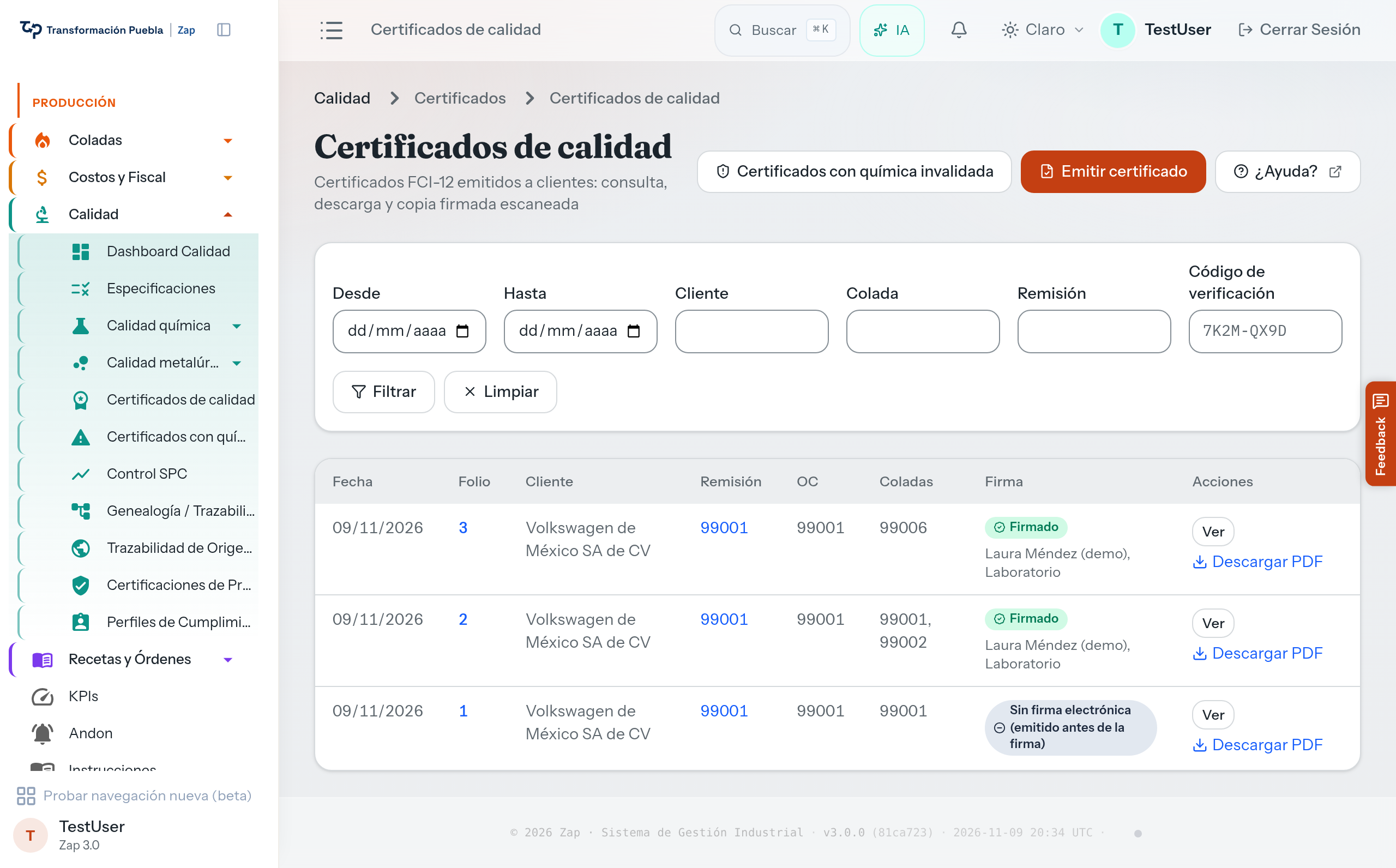
Section titled “5. Invoicing downloads it”In Calidad → Certificados de calidad, find the delivery note and press Descargar PDF (Download PDF). The PDF carries the electronic signature and its verification code. If someone later doubts that a PDF came out of Zap as it is, that code proves it: Verify a certificate.
See also
Section titled “See also”- Check a heat’s chemistry: everything a heat’s detail says in ARL Lab.
- How ARL Lab decides whether a heat is released: why a single reading decides.
- Certificate signers: who can sign.
- Review certificates with invalidated chemistry: if the chemistry of an issued certificate is invalidated later.