
Your first day in WorkForce
First day in WorkForce? Follow the walkthrough that fits you. Each step links to the guide with the detail.
The five-minute walkthrough
Section titled “The five-minute walkthrough”Your day starts when you clock your Entrada (Clock-in). At Transformación Puebla you clock in Reloj, with your employee number and your PIN: Record your attendance with Reloj. Where the WorkForce kiosk is already in place, which is in pilot, you clock in with your face or your PIN: Clock in and out.
-
Open Mi portal (My portal). It greets you with Hola (Hello) and your name. There you find Mi asistencia hoy (My attendance today), your Saldo de vacaciones (Vacation balance: Otorgados, Tomados and Disponibles, granted, taken and available), Mis ausencias (My absences) and Mi perfil (My profile) with your RFC, your CURP, your NSS and your hire date.
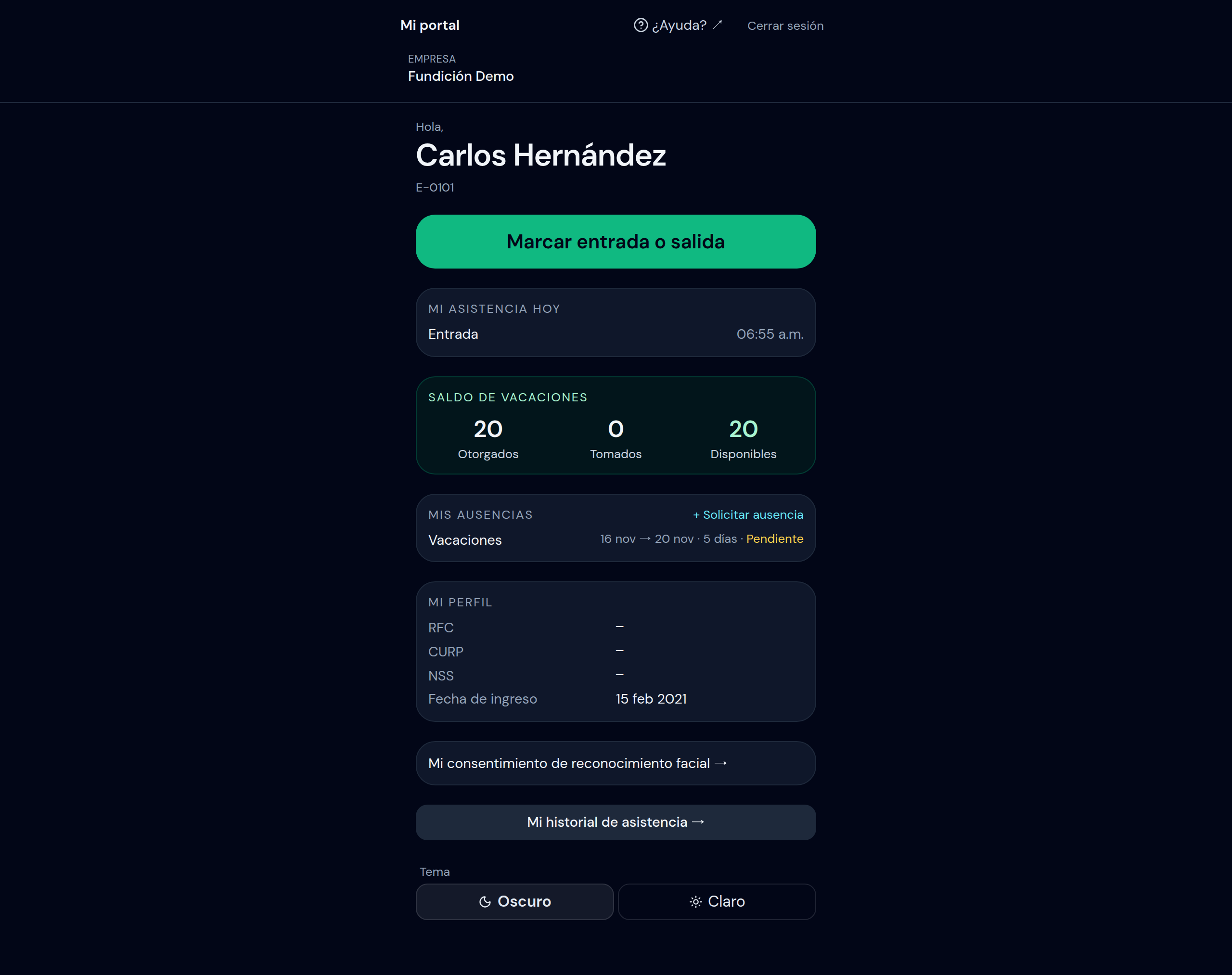
Everything about you is on a single page: your attendance, your vacation, your absences and your pay slips. -
Check your attendance. Mi asistencia hoy shows your clock-ins for the day. A record that is Pendiente de revisión (Pending review) does not count yet: someone still has to approve it. In Mi historial de asistencia (My attendance history) you pick Desde and Hasta (From and To) and tap Buscar (Search). → Detail: View my attendance history
-
Request an absence. In Mis ausencias, tap Solicitar ausencia (Request absence). Pick the Tipo (Type), the Desde and Hasta dates, write the Razón (Reason) and tap Enviar (Send). → Detail: Request and approve absences
-
Follow your request. It shows as Pendiente (Pending) and changes to Aprobada or Rechazada (Approved or Rejected). If it is rejected, you see the Motivo del rechazo (Rejection reason).
-
View your pay slips. Mis recibos (My pay slips) has each pay slip with its Percepciones (Earnings), its Deducciones (Deductions) and the Neto (Net). Tap it to see its detail; there you can Imprimir (Print) the pay slip. → Detail: Use Mi portal
-
Start with the summary. Resumen de hoy (Today’s summary) brings together Asistencia de hoy (Today’s attendance), Marcas por revisar (Records to review), Ausencias de hoy (Today’s absences) and the Próximo periodo de nómina (Next payroll period). If you are a supervisor, you only see your areas.
-
Work your inbox. The Bandeja de aprobaciones (Approvals inbox) gathers the requests that are Pendientes de aprobar (Pending approval). From there you also reach Marcas por revisar →. → Detail: Use the Approvals inbox
-
Check attendance. Asistencia de hoy shows the Tablero del día (Day board), based on each person’s schedule. → Detail: Manage attendance
-
Add an employee. In Empleados (Employees), tap Nuevo empleado (New employee). → Detail: Register an employee
-
If your role is Payroll, open Nómina (Payroll). There you create a Nuevo periodo (New period), tap Calcular preliminar (Calculate preliminary) and, if everything adds up, Bloquear y guardar (Lock and save). → Detail: Calculate and lock the payroll
What’s next?
Section titled “What’s next?”See also
Section titled “See also”- WorkForce: all the guides.
- Getting started in WorkForce: how to sign in, the roles and the menu.